
Introduction
This is my very first blog post, written with my own two hands, so please be kind and don’t hesitate to send me feedback so I can improve. And above all, thank you for taking the time to read it.
At the very beginning of my journey into software development, and more specifically web development, I started by learning the basics with HTML, CSS and JavaScript, pretty much like everyone else does at first. I spent years on that stack, which felt sufficient, lightweight, logical and pleasant to use. Three simple files were enough to make me happy: index.html, styles.css, main.js.
Later on, I moved to more complex libraries and frameworks, partly out of necessity, because I could no longer collaborate easily with my fellow students who were using more modern tools. It was either adapt or fall behind, and I chose to adapt.
I started by learning ReactJS, which was the most popular library at the time, and I was impressed by its simplicity and flexibility. I’ll admit my React learning curve was fast and enjoyable, thanks to a wonderful course by Maximilian Schwarzmüller on Udemy that I highly recommend.
Over time, I grew to love ReactJS for its community, its rich ecosystem and its ability to build performant web applications. I had some incredible collaboration moments with friends, I worked on personal projects, and I genuinely enjoyed it. However, as the years went by, I also started noticing certain limitations and frustrations with ReactJS that pushed me to explore other paths and, eventually, to discover SolidJS.
What started to frustrate me with React
My frustrations with ReactJS began when I realized just how many patterns you have to follow to do things optimally, whether it’s the project structure, state management, or even the way you write components.
The thing that bothered me the most was the rendering model itself. In React, a component’s function is re-executed entirely on every state change, and everything inside it is recomputed along the way. Let’s take a very simple example:
function Parent() {
  const [count, setCount] = useState(0);

  // Recreated on EVERY render, even though count has nothing to do with it
  const handleClick = () => console.log("click");

  return (
    <div>
      <button onClick={() => setCount(count + 1)}>{count}</button>
      <Child onClick={handleClick} />
    </div>
  );
}
Here, every click on the button re-renders Parent, recreates the handleClick function, and therefore triggers a useless re-render of Child — even though nothing about it changed. To avoid this, you have to wrap handleClick in a useCallback, memoize computed values with useMemo, and wrap Child in React.memo. Three “tricks” just for this trivial case.
That’s precisely what bothered me: these optimizations don’t fix a real business problem, they compensate for React’s rendering model itself. I found it counter-intuitive and hard to master, especially for a beginner — and I was not an expert at the time (nor really today, to be honest).
React kept evolving, though, and we even got a rebranding of the documentation and the official homepage, which is a good thing in itself. But what surprised me was that this new documentation now explicitly recommended reaching for solutions like NextJS, React Router or RemixJS to start a project. And personally, I really didn’t want to fall into that over-engineering for projects that didn’t need it — and so far, I never have.

It also came with a strong push toward the concept of SSR (Server-Side Rendering), which felt strange to me at first. Once I took the time to properly understand it, I realized that, for the vast majority of my use cases, it was simply unnecessary and mostly added complexity without any real benefit.
In parallel, I was well aware that other frameworks existed that were more performant, more modern, and that kept the JSX syntax I already enjoyed with React. That pushed me to look into them more seriously, rather than staying stuck on a stack that was starting to weigh on me.
Finally, the security vulnerabilities discovered recently in the React ecosystem only confirmed that my decision to switch was the right one. I’m thinking in particular of CVE-2026-23870, which affected the React Server Components used by NextJS — exactly the kind of extra complexity I was trying to avoid in the first place. In short, I don’t regret my choice at all.
Discovering SolidJS: a different mental model
That’s how I discovered SolidJS, a framework that immediately won me over with its simplicity and performance. SolidJS adopts a reactivity model different from React’s, based on signals rather than a virtual rendering system. By the way, if the topic interests you, this benchmark comparing signals to the Virtual DOM illustrates the performance differences between these two architectures quite well. This allows for impressive performance while keeping a familiar syntax thanks to JSX. On top of that, SolidJS is designed to be lightweight and fast, which fits my needs as a web developer perfectly. I was pleasantly surprised to find that I could build performant, reactive web apps with far less code and complexity than with React. As mentioned earlier, it works with a JSX syntax, which made me feel comfortable right from the start and meant I didn’t have to relearn a new syntax.
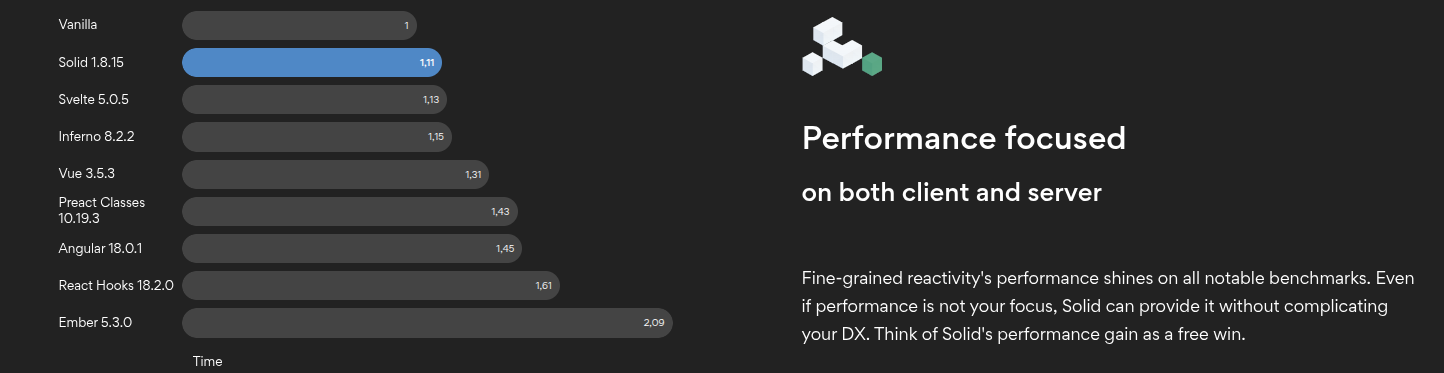
To illustrate how natural the transition really is, here’s the same small counter component written in React and then in SolidJS:
import { useState } from "react";

function Counter() {
  const [count, setCount] = useState(0);

  return (
    <div>
      <p>Count: {count}</p>
      <button onClick={() => setCount(count + 1)}>Increment</button>
    </div>
  );
}
import { createSignal } from "solid-js";
function Counter() {
const [count, setCount] = createSignal(0);
return (
<div>
<p>Count: {count()}</p>
<button onClick={() => setCount(count() + 1)}>Increment</button>
</div>
);
}As you can see, the component structure and the JSX syntax stay almost identical. The only real differences are in how state is created (useState vs createSignal) and how the value is read (count vs count(), because in Solid you call a signal like a function). Nothing insurmountable, and that’s exactly what allowed me to feel at home right away.
But the real magic isn’t in the syntax, it’s in the behavior. Remember my Parent/Child example from earlier? To make it truly optimal in React, you have to rewrite it like this:
import { useState, useCallback, memo } from "react";

// Child has to be wrapped in memo to avoid useless re-renders
const Child = memo(function Child({ onClick }) {
  return <button onClick={onClick}>Child</button>;
});

function Parent() {
  const [count, setCount] = useState(0);

  // useCallback to keep the same reference between renders
  const handleClick = useCallback(() => console.log("click"), []);

  return (
    <div>
      <button onClick={() => setCount(count + 1)}>{count}</button>
      <Child onClick={handleClick} />
    </div>
  );
}memo, useCallback, an empty dependency array you mustn’t forget… all that for a trivial component. And now, here’s exactly the same case, but in SolidJS:
function Parent() {
  const [count, setCount] = createSignal(0);

  // Created ONCE: the component function never re-runs
  const handleClick = () => console.log("click");

  return (
    <div>
      <button onClick={() => setCount(count() + 1)}>{count()}</button>
      <Child onClick={handleClick} />
    </div>
  );
}
And this is where everything clicks: in Solid, a component’s function only runs once, at creation. It does not re-run on every state change. When you click the button, only the bit of DOM that actually reads count() gets updated, nothing else. handleClick is never recreated, and Child is never re-rendered for no reason.
The result: useCallback, useMemo, React.memo… everything I used to add to compensate for React’s rendering model becomes simply unnecessary. There’s nothing to memoize, because there’s nothing re-executing in excess. This is exactly what I was looking for: performance by default, without having to think about it.
Where SolidJS fits in today’s frontend ecosystem
Today, SolidJS positions itself as a modern, performant alternative to traditional JavaScript frameworks. It’s especially well suited for developers looking for a lightweight, fast and easy-to-learn solution, while keeping a familiar syntax thanks to JSX. Companies like Bloomberg, NordVPN and Mobeta have already adopted SolidJS for their projects, which speaks to its maturity and reliability. On top of that, the community around SolidJS is growing fast, with many contributors and high-quality documentation that makes the framework easy to learn and adopt. All in all, SolidJS stands out as a smart choice for web developers who want to build performant applications without sacrificing simplicity and developer experience.
What I still miss about React
What I still miss with ReactJS today is mostly the richness of its ecosystem and the size of its community. With thousands of libraries, tools and resources available, it’s often easier to find ready-made solutions for specific needs. React’s popularity also means there’s a huge amount of documentation, tutorials and community support, which can be very valuable for beginners and experienced developers alike. Still, despite these advantages, I don’t regret my decision to move to SolidJS, because I find that its simplicity and performance largely make up for those aspects.
Conclusion
My move from ReactJS to SolidJS was driven by a search for simplicity, performance and a more enjoyable development experience. React remains an excellent framework, backed by a massive community, but SolidJS simply fits my way of working better: performance by default, without the memoization ceremony, and a JSX syntax that makes the transition almost painless.
If you’re curious or in a similar situation, I strongly encourage you to give it a try — the choice between the two will always depend on your needs and preferences. And if you need a full-stack framework in the spirit of NextJS, know that there’s an equivalent on the Solid side: SolidStart, which offers routing, server rendering and more while keeping the lightness that makes Solid so strong.
And if you’d like a quick and fun overview of what SolidJS is, I’ll leave you with the excellent “SolidJS in 100 Seconds” video by Fireship: